Module and Model compliance tests
The pcssp_module_test and pcssp_topmodel_test classes already implement various PCSSP compliance tests for your modules and models. This section goes a bit deeper into their implementation and reasoning.
Module V&V
The pcssp_module_test executes the following steps for each PCSPP module:
clear all variables
force close all sldd’s
call module-init
print info
call module setup
update the module .slx (ctrl+D) in Simulink
call the module test harness (if it exists)
This is essentially the technical implementation: starting from a clean slate, the module setup is called and the module is updated. Any errors during that process will cause the V&V to fail.
Code generation compliance
Model advisor tests
By setting the isCodegen flag in your pcssp_module_test to true (see Authoring module tests) PCSSP will launch a series of Simulink Check validations to scrutinize your module for code generation compliance. In principle, these tests do not generate code, they merely go over your module and the settings therein to preemptively warn against choices that will break the code generation or real-time execution. For the moment all 9 Model Advisor Checks in the Simulink Coder section are selected (see below). In the future these will be augmented with more detailed tests from the embedded coder suite.
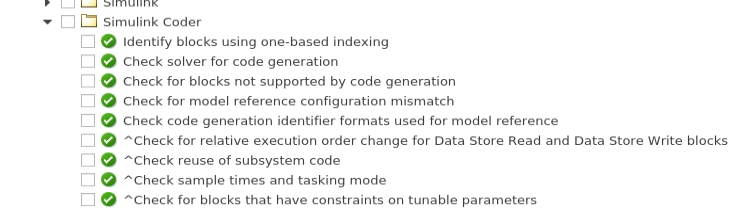
Snippet from the Simulink model advisor that is programatically called for your PCSSP models.
PCSSP fully relies on the Simulink Model advisor for this: we simply select tests that are applicable for code generation and call them programmatically using ModelAdvisor.run (see the Matlab documentation for more details). The checks that are run are saved as a small list of Simulink Check IDs under /testing/checkinstanceIDs.txt.
Software-in-the-loop
If your module is earmarked for code generation using the isCodegen=1 flag in the pcssp_module_test class, the framework automatically tries to generate RTF compatible C++ code and will report on the succes. Additionally, you can provide a module Test Harness (see Authoring module tests) which for codeGen modules also gets called as ‘software-in-the-loop’, i.e. harnessing the actual generated code.
Matlab Advisory Board (MAB) standards
The Matlab advisory board consists of members of the Simulink modeling community (e.g. automotive and aerospace engineering companies like Ferrari, Airbus, and BMW) that collectively distribute a long list of model standards to maximize:
collaboration
Model clarity
Parameter visibility
Signal specifications
etc.
These modeling standards can be automatically checked using Simulink Check, which we apply to PCSSP modules. It is often useful to run these checks before committing your models and launching the CI pipeline to catch any non-compliance early on. This will be explained in the next section.
Running the checks programmatically
Running Simulink Check is remarkably easy. We have exported the IDs of the relevant checks to separate files for each task (codegen, model MAB compliance), which you can manually load from the testing/ directory. Then you can simply run the checks by calling result = ModelAdvisor.run(module.modelname,checkIDs,'Force','On').
