Authoring module tests
This page details the specifics of authoring tests for PCSSP standalone modules. Testing of these modules is relatively straightforward since their module structure is standardized. The basic module Validation&Verification (V&V) tests are therefore implemented in a superclass called pcssp_module_test in the testing/ directory. This V&V already takes care of the following tests for all modules:
clear all variables
force close and remove all unversioned sldd’s
call module init
print info
call module setup
update/compile the module .slx (ctrl+D) in Simulink
call the module test harness (if it exists, see below)
Each module simply inherits a class from this superclass as follows:
classdef pcssp_TF_test < pcssp_module_test
% test suite for TF pcssp module
% T. Ravensbergen July 2023
        properties
                algoobj = @pcssp_TF_obj;
                isCodegen = false;
        end

end
The superclass pcssp_module_test requires two properties to be defined for each inherited module test: The handle pointing to the module definition function (with tunable and fixed parameters, etc.), and a flag indicating whether the module should be scrutinized for code generation compatibility.
Note
These properties are abstract, so you must define them in your inherited test class to prevent abstract class errors in matlab.
Test harness
In addition to basic V&V, the PCSSP module test class supports the automatic recognition and running of a test harness, a new slx model harnessing your module. This facilitates the testing of masked pcssp modules and the injection of test input waveforms. For this to work, you need to supply:
a slx model acting as harness around your module, named
<module_name>_harness.slxa m-script loading the test waveforms, initializing the module, and running the simulation. This script should be called
<module_name>_harness_run.mand should take the PCSSP module object as argument:
function out = pcssp_PID_harness_run(obj)

        % initialize object
        obj.init;
        obj.setup;

        pcssp_PID_tp = obj.get_nominal_tp_value('pcssp_PID_tp');

        % define input waveforms
        SimIn = Simulink.SimulationInput([obj.getname '_harness']);
        ds = createInputDataset(obj.getname);

        input.error = timeseries(5*ones(1,2),[0 10]); % create a new structure that matches the PID 'error' input bus
        ds = setElement(ds,1,input,'error');

        SimIn = SimIn.setExternalInput(ds);

        % add variable in PID model mask to the simulation
        SimIn = setVariable(SimIn,'pcssp_PID_tp',pcssp_PID_tp);

        out = sim(SimIn);

end
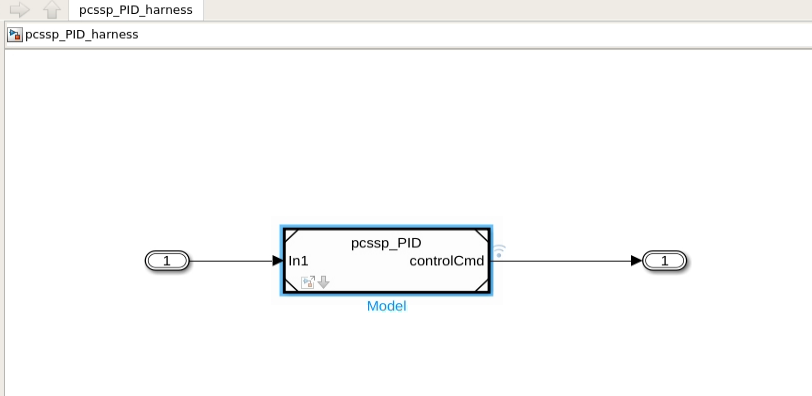
pcssp_PID_harness.slx model harnassing the pcssp_PID module for testing purposes.
Software-in-the-loop test
If your module is flagged for code generation (isCodegen=true in the property above PCSSP model test class) the above test harness will additionally run in software-in-the-loop mode. During this test, code is generated for your module, and the generated code is directly called from within Simulink. This allows straightforward back-to-back tests of your module against its to-be-deployed version on the PCS.
Adding tests
Adding more tests in addition to the basic V&V tests already defined in the superclass is easy: simply add a methods section to the above class definition as follows:
classdef pcssp_TF_test < pcssp_module_test
% test suite for TF pcssp module
% T. Ravensbergen July 2023
properties
        algoobj = @pcssp_TF_obj;
        isCodegen = false;
end

methods (Test)
        function run_verification_sim(testCase)

        module = testCase.algoobj();
        module.init;
        module.setup;

        import Simulink.sdi.constraints.MatchesSignal;


        %% load and prep test data
                % do stuff
        end
end

end
Examples of this approach are provided in the templates/ directory of the repository.
Note
Due to the indirect inheritance of the matlab.unittest class (via pcssp_module_test) Matlab does not always recognize a test class .m file such as the above pcssp_TF_test as a testing script. The run tests button is therefore not always visible upon opening the .m-file. In those cases, simply running the test via runtests('pcssp_TF_test') forces Matlab to recognize the .m file as test class.
Attention
Large test data sets (mat-files etc.) should not be committed to git. Instead, from SDCC, you can put them in /work/imas/shared/TEST/pcssp/ to which Bamboo also has access. If your tests run on RTF infrastructure you can put it in /var/jenkins/workspace/Matlab. The paths to these two locations are automatically added to the matlab search path in the run_tests scripts.
